Active Directory – Supersonic and the directory searcher
Whats the difference between supersonic and the directory searcher? Nothing, because if you get over ~1000 you crash into a wall. ![]()
Last week we had to deal with the limitations on the directory searcher.
We performed a user search on an organizational unit (subtree) with more than 1000 users beneath. We where astonished that our userobject only contained 1000 items every time we did the search. I wrote a little test script in powershell to reproduce this behaviour and to see if this limitation is a C# problem or not.
So I wrote this script:
import-module activedirectory
$intCounter = 0
$objDomain = New-Object System.DirectoryServices.DirectoryEntry
$objSearcher = New-Object System.DirectoryServices.DirectorySearcher
$objSearcher.SearchRoot = $objDomain
$objSearcher.Filter = ("(objectclass=user)")
$colResults = $objSearcher.FindAll()
foreach ( $objResult in $colResults ) {$intCounter = $intCounter + 1}
write-host "Found $intCounter entries"
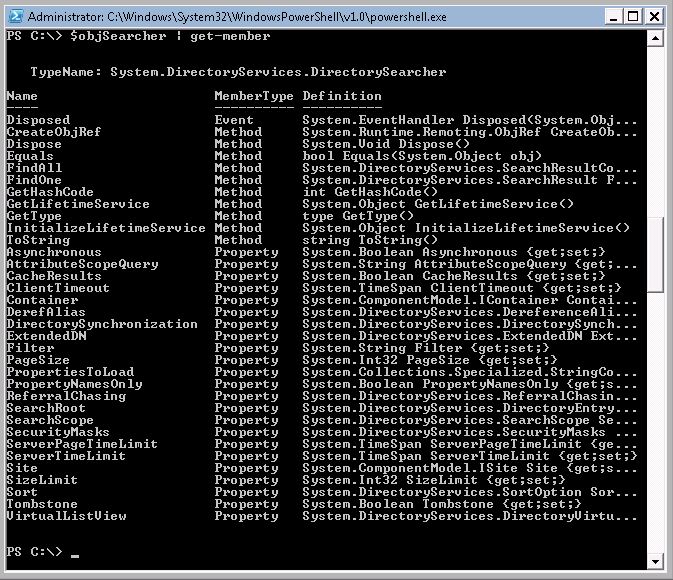
As expected, powershell returned only 1000 objects. Then we tried to find out why and looked at the $objSearcher property list.
$objSearcher | get-member
As you can see, there are two interesting properties: sizelimit and pagesize. So I played around with these two properties and found some explanations for them. Sizelimit is the limit for the maximum returned results, but you can't set this property above 1000. So I looked at the second property, pagesize. This property sets the maximum result items per returned page. So all you have to do is, set sizelimit to 0 and set pagesize to 1000 and you will get all of your items.
import-module activedirectory
$intCounter = 0
$objDomain = New-Object System.DirectoryServices.DirectoryEntry
$objSearcher = New-Object System.DirectoryServices.DirectorySearcher
$objSearcher.SearchRoot = $objDomain
$objSearcher.sizelimit = 0
$objSearcher.pagesize = 1000
$objSearcher.Filter = ("(objectclass=user)")
$colResults = $objSearcher.FindAll()
foreach ( $objResult in $colResults ) {$intCounter = $intCounter + 1}
write-host "Found $intCounter entries"
If you set pagesize to 1000 and expect more than 1000 returned items the active directory returns your first 1000 items, then pause for a split and returns the next x items and so on until all found items are returned. This property has a appreciable impact on your searchresult duration.
After some research I found some tutorials on how to increment these limitations in the active directory, but i don't know what impact such a change would have, so i can live with the pagesize property
Letzte Artikel
- DIY Standlampe – Nussbaumholz (one legged)
- Active Directory W2008 R2 – Remove DNS record with Powershell and WMI
- IRDioder – Ikea Dioder Hack mit Atmel und Infrarotempfaenger
- Powershell – Rename domain computer remotely (within an active directory domain as well)
- Powershell – SCCM – Readvertise a previously installed softwarepackage remotly (not from console)
Kategorien
- Allgemein (13)
- Business (9)
- Coding (15)
- .NET (3)
- AutoIt (2)
- JQuery (5)
- Powershell (1)
- Scripting (2)
- Elektronik (13)
- AVR – Küchenbeleuchtung (9)
- AVR – Misc (2)
- Hobby (14)
- YDR Tools (4)
Archive
- Mai 2012 (1)
- April 2012 (1)
- März 2012 (1)
- Februar 2012 (1)
- Oktober 2011 (2)
- September 2011 (1)
- August 2011 (4)
- Juni 2011 (3)
- Mai 2011 (1)
- Dezember 2010 (2)
- April 2010 (1)
- März 2010 (1)
- Februar 2010 (2)
- November 2009 (1)
- Oktober 2009 (8)
- August 2009 (2)
- April 2009 (1)
- März 2009 (1)
- November 2008 (1)
- Oktober 2008 (1)
- Juli 2008 (1)
- Mai 2008 (1)
- April 2008 (6)